使用 Cloudflare 作为网关去访问
本文记录通过 Cloudflare 网关捕获的 AutoGen SelectorGroupChat 与大模型交互的完整请求/响应数据,用于分析 Agent 调度的工作原理。
分析目的
通过 Cloudflare 网关可以捕获到 AutoGen 与大模型 API 之间的所有请求,帮助理解:
SelectorGroupChat如何选择下一个 Agent- 每轮对话的 Prompt 构造方式
- Token 消耗情况
第一轮:选择初始 Agent
根据 Cloudflare 来获取实际的分析数据。
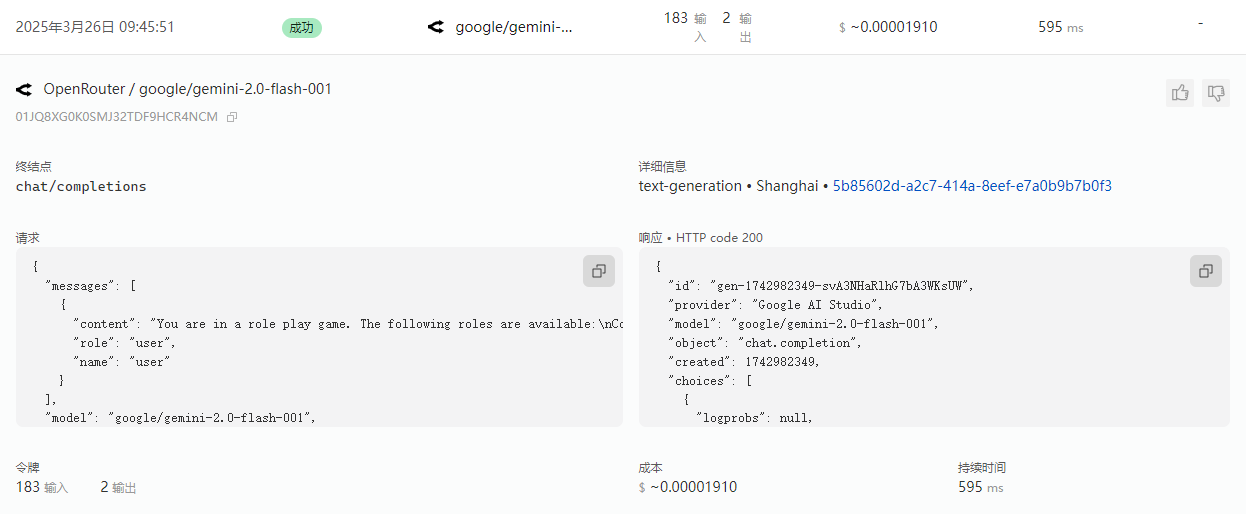
{
  "messages": [
    {
      "content": "You are in a role play game. The following roles are available:\nCoordinator: An agent that provides assistance with ability to use tools.\nMySQL_Agent: An agent that provides assistance with ability to use tools.\nInfluxDB_Agent: An agent that provides assistance with ability to use tools..\nRead the following conversation. Then select the next role from ['Coordinator', 'MySQL_Agent', 'InfluxDB_Agent'] to play. Only return the role.\n\nuser: 从mysql的表rfid_infos里面查看最后一条记录里面的match_device_measurements是使用','分割的measurement列表。在influx里面对应measurement的值信息,根据first_rcd_time和180秒时长进行查询\n\n\n\nRead the above conversation. Then select the next role from ['Coordinator', 'MySQL_Agent', 'InfluxDB_Agent'] to play. Only return the role.\n",
      "role": "user",
      "name": "user"
    }
  ],
  "model": "google/gemini-2.0-flash-001",
  "stream": false
}
{
"id": "gen-1742982349-svA3NHaRlhG7bA3WKsUW",
"provider": "Google AI Studio",
"model": "google/gemini-2.0-flash-001",
"object": "chat.completion",
"created": 1742982349,
"choices": [
{
"logprobs": null,
"finish_reason": "stop",
"native_finish_reason": "STOP",
"index": 0,
"message": {
"role": "assistant",
"content": "Coordinator\n",
"refusal": null
}
}
],
"usage": {
"prompt_tokens": 183,
"completion_tokens": 2,
"total_tokens": 185
}
}第二轮
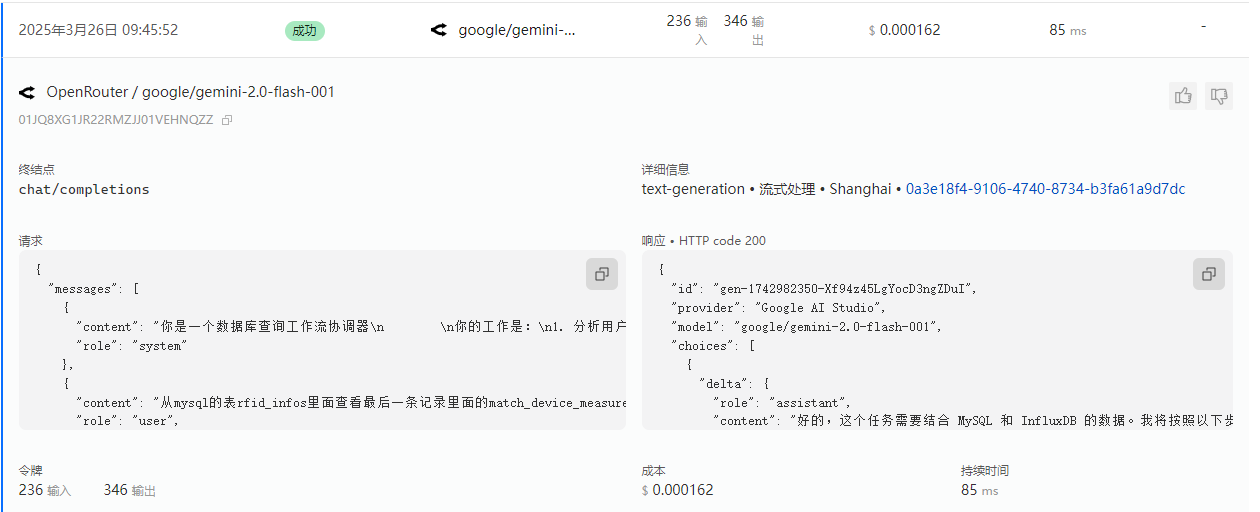
{
  "messages": [
    {
      "content": "你是一个数据库查询工作流协调器\n        \n你的工作是:\n1. 分析用户查询以确定是否需要MySQL、InfluxDB或两者\n2. 将查询定向到适当的agent\n3. 确保在需要时将MySQL中找到的数据正确传递给InfluxDB\n4. 为用户总结整体结果\n5. 当完整工作流完成时添加\"TERMINATE\"\n6. 一定要是已经查询过MysqlAgent和InfluxAgent获得数据后才可以结束,不能够只是分析了下要分别调用这两个Agent就结束\n7. 注意Mysql是+8时区的,Influx是UTC时区的,需要考虑时区的转换\n\n对于需要两个数据库的工作流:\n- 首先指导MySQL_Agent检索必要信息\n- 然后帮助InfluxDB_Agent理解需要哪些来自MySQL的数据进行查询\n- 最后将结果编译成连贯的响应\n",
      "role": "system"
    },
    {
      "content": "从mysql的表rfid_infos里面查看最后一条记录里面的match_device_measurements是使用','分割的measurement列表。在influx里面对应measurement的值信息,根据first_rcd_time和180秒时长进行查询",
      "role": "user",
      "name": "user"
    }
  ],
  "model": "google/gemini-2.0-flash-001",
  "stream": true
}
{
"id": "gen-1742982350-Xf94z45LgYocD3ngZDuI",
"provider": "Google AI Studio",
"model": "google/gemini-2.0-flash-001",
"choices": [
{
"delta": {
"role": "assistant",
"content": "好的,这个任务需要结合 MySQL 和 InfluxDB 的数据。我将按照以下步骤进行:\n\n**1. 分析查询需求:**\n\n* 需要从 MySQL 的 `rfid_infos` 表中获取最后一条记录的 `match_device_measurements` 字段。\n* `match_device_measurements` 字段是一个以逗号分隔的 measurement 列表。\n* 需要从 InfluxDB 中查询这些 measurement 对应的数据。\n* 查询 InfluxDB 的时间范围是基于 MySQL 表中最后一条记录的 `first_rcd_time` 字段,以 `first_rcd_time` 为开始时间,加上 180 秒。\n* 需要考虑MySQL的+8时区与InfluxDB的UTC时区转换\n\n**2. 确定执行顺序:**\n\n1. **MySQL Agent:** 首先,指示 MySQL Agent 查询 `rfid_infos` 表中最后一条记录的 `match_device_measurements` 和 `first_rcd_time` 字段。\n2. **数据转换:** 将从 MySQL 获取的 `first_rcd_time` 转换为 UTC 时间。\n3. **InfluxDB Agent:** 然后,指示 InfluxDB Agent 使用从 MySQL 获取的 `match_device_measurements` 列表和转换后的 UTC 时间范围进行查询。\n4. **结果汇总:** 将从 InfluxDB 获取的数据进行整理,并返回给用户。\n\n**3. 开始执行:**\n\n我将首先调用 MySQL Agent。\n\n```tool_code\nmysql_agent.get_last_rfid_info()\n```"
}
}
],
"usage": {
"prompt_tokens": 236,
"completion_tokens": 346,
"total_tokens": 582
},
"streamed_data": [
{
"nonce": "8a8aeb57d34d27",
"id": "gen-1742982350-Xf94z45LgYocD3ngZDuI",
"provider": "Google AI Studio",
"model": "google/gemini-2.0-flash-001",
"object": "chat.completion.chunk",
"created": 1742982350,
"choices": [
{
"index": 0,
"delta": {
"role": "assistant",
"content": "好的"
},
"finish_reason": null,
"native_finish_reason": null,
"logprobs": null
}
]
},
{
"nonce": "3ea47b602d1197",
"id": "gen-1742982350-Xf94z45LgYocD3ngZDuI",
"provider": "Google AI Studio",
"model": "google/gemini-2.0-flash-001",
"object": "chat.completion.chunk",
"created": 1742982350,
"choices": [
{
"index": 0,
"delta": {
"role": "assistant",
"content": ",这个任务需要结合 MySQL 和 InfluxDB 的数据。我将按照"
},
"finish_reason": null,
"native_finish_reason": null,
"logprobs": null
}
]
},
{
"nonce": "e3",
"id": "gen-1742982350-Xf94z45LgYocD3ngZDuI",
"provider": "Google AI Studio",
"model": "google/gemini-2.0-flash-001",
"object": "chat.completion.chunk",
"created": 1742982350,
"choices": [
{
"index": 0,
"delta": {
"role": "assistant",
"content": "以下步骤进行:\n\n**1. 分析查询需求:**\n\n* "
},
"finish_reason": null,
"native_finish_reason": null,
"logprobs": null
}
]
},
{
"nonce": "22cc6c",
"id": "gen-1742982350-Xf94z45LgYocD3ngZDuI",
"provider": "Google AI Studio",
"model": "google/gemini-2.0-flash-001",
"object": "chat.completion.chunk",
"created": 1742982350,
"choices": [
{
"index": 0,
"delta": {
"role": "assistant",
"content": "需要从 MySQL 的 `rfid_infos` 表中获取最后一条记录的 `match_device_measurements` 字段。\n* `match_"
},
"finish_reason": null,
"native_finish_reason": null,
"logprobs": null
}
]
},
{
"nonce": "40a9774c",
"id": "gen-1742982350-Xf94z45LgYocD3ngZDuI",
"provider": "Google AI Studio",
"model": "google/gemini-2.0-flash-001",
"object": "chat.completion.chunk",
"created": 1742982350,
"choices": [
{
"index": 0,
"delta": {
"role": "assistant",
"content": "device_measurements` 字段是一个以逗号分隔的 measurement 列表。\n* 需要从 InfluxDB 中查询这些 measurement 对应的数据"
},
"finish_reason": null,
"native_finish_reason": null,
"logprobs": null
}
]
},
{
"nonce": "34645d",
"id": "gen-1742982350-Xf94z45LgYocD3ngZDuI",
"provider": "Google AI Studio",
"model": "google/gemini-2.0-flash-001",
"object": "chat.completion.chunk",
"created": 1742982350,
"choices": [
{
"index": 0,
"delta": {
"role": "assistant",
"content": "。\n* 查询 InfluxDB 的时间范围是基于 MySQL 表中最后一条记录的 `first_rcd_time` 字段,以 `first_rcd_time` 为开始时间,加上 180"
},
"finish_reason": null,
"native_finish_reason": null,
"logprobs": null
}
]
},
{
"nonce": "24c660",
"id": "gen-1742982350-Xf94z45LgYocD3ngZDuI",
"provider": "Google AI Studio",
"model": "google/gemini-2.0-flash-001",
"object": "chat.completion.chunk",
"created": 1742982350,
"choices": [
{
"index": 0,
"delta": {
"role": "assistant",
"content": " 秒。\n* 需要考虑MySQL的+8时区与InfluxDB的UTC时区转换\n\n**2. 确定执行顺序:**\n\n1. **MySQL Agent:** 首先,指示 MySQL Agent 查询 `rfid_"
},
"finish_reason": null,
"native_finish_reason": null,
"logprobs": null
}
]
},
{
"nonce": "44",
"id": "gen-1742982350-Xf94z45LgYocD3ngZDuI",
"provider": "Google AI Studio",
"model": "google/gemini-2.0-flash-001",
"object": "chat.completion.chunk",
"created": 1742982350,
"choices": [
{
"index": 0,
"delta": {
"role": "assistant",
"content": "infos` 表中最后一条记录的 `match_device_measurements` 和 `first_rcd_time` 字段。\n2. **数据转换:** 将从 MySQL 获取的 `first_rcd_time` 转换为 UTC 时间。\n3. **InfluxDB Agent:** 然后,"
},
"finish_reason": null,
"native_finish_reason": null,
"logprobs": null
}
]
},
{
"nonce": "33fd83c0d8d7ff4f",
"id": "gen-1742982350-Xf94z45LgYocD3ngZDuI",
"provider": "Google AI Studio",
"model": "google/gemini-2.0-flash-001",
"object": "chat.completion.chunk",
"created": 1742982350,
"choices": [
{
"index": 0,
"delta": {
"role": "assistant",
"content": "指示 InfluxDB Agent 使用从 MySQL 获取的 `match_device_measurements` 列表和转换后的 UTC 时间范围进行查询。\n4. **结果汇总:** 将从 InfluxDB 获取的数据进行整理,并返回给用户。\n\n**3. 开始执行:**\n\n我将"
},
"finish_reason": null,
"native_finish_reason": null,
"logprobs": null
}
]
},
{
"nonce": "ae",
"id": "gen-1742982350-Xf94z45LgYocD3ngZDuI",
"provider": "Google AI Studio",
"model": "google/gemini-2.0-flash-001",
"object": "chat.completion.chunk",
"created": 1742982350,
"choices": [
{
"index": 0,
"delta": {
"role": "assistant",
"content": "首先调用 MySQL Agent。\n\n```tool_code\nmysql_agent.get_last_rfid_info()\n```"
},
"finish_reason": "stop",
"native_finish_reason": "STOP",
"logprobs": null
}
]
},
{
"nonce": "53574c",
"id": "gen-1742982350-Xf94z45LgYocD3ngZDuI",
"provider": "Google AI Studio",
"model": "google/gemini-2.0-flash-001",
"object": "chat.completion.chunk",
"created": 1742982350,
"choices": [
{
"index": 0,
"delta": {
"role": "assistant",
"content": ""
},
"finish_reason": null,
"native_finish_reason": null,
"logprobs": null
}
],
"usage": {
"prompt_tokens": 236,
"completion_tokens": 346,
"total_tokens": 582
}
}
]
}第三轮
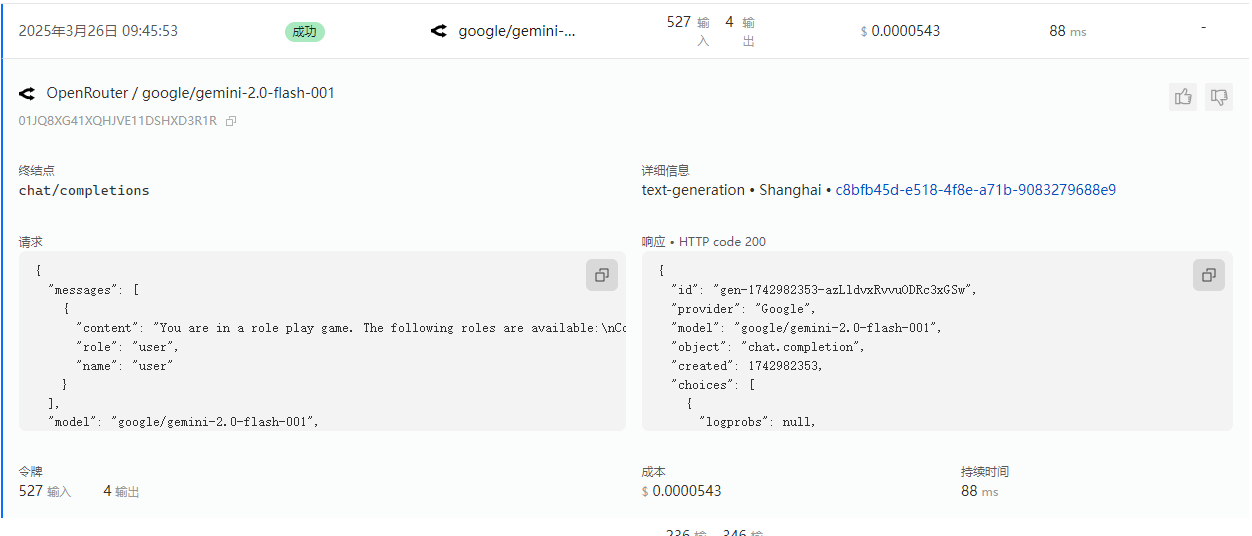
{
  "messages": [
    {
      "content": "You are in a role play game. The following roles are available:\nCoordinator: An agent that provides assistance with ability to use tools.\nMySQL_Agent: An agent that provides assistance with ability to use tools.\nInfluxDB_Agent: An agent that provides assistance with ability to use tools..\nRead the following conversation. Then select the next role from ['MySQL_Agent', 'InfluxDB_Agent'] to play. Only return the role.\n\nuser: 从mysql的表rfid_infos里面查看最后一条记录里面的match_device_measurements是使用','分割的measurement列表。在influx里面对应measurement的值信息,根据first_rcd_time和180秒时长进行查询\n\n\nCoordinator: 好的,这个任务需要结合 MySQL 和 InfluxDB 的数据。我将按照以下步骤进行:\n\n**1. 分析查询需求:**\n\n*   需要从 MySQL 的 `rfid_infos` 表中获取最后一条记录的 `match_device_measurements` 字段。\n*   `match_device_measurements` 字段是一个以逗号分隔的 measurement 列表。\n*   需要从 InfluxDB 中查询这些 measurement 对应的数据。\n*   查询 InfluxDB 的时间范围是基于 MySQL 表中最后一条记录的 `first_rcd_time` 字段,以 `first_rcd_time` 为开始时间,加上 180 秒。\n*   需要考虑MySQL的+8时区与InfluxDB的UTC时区转换\n\n**2. 确定执行顺序:**\n\n1.  **MySQL Agent:** 首先,指示 MySQL Agent 查询 `rfid_infos` 表中最后一条记录的 `match_device_measurements` 和 `first_rcd_time` 字段。\n2.  **数据转换:** 将从 MySQL 获取的 `first_rcd_time` 转换为 UTC 时间。\n3.  **InfluxDB Agent:** 然后,指示 InfluxDB Agent 使用从 MySQL 获取的 `match_device_measurements` 列表和转换后的 UTC 时间范围进行查询。\n4.  **结果汇总:**  将从 InfluxDB 获取的数据进行整理,并返回给用户。\n\n**3. 开始执行:**\n\n我将首先调用 MySQL Agent。\n\n```tool_code\nmysql_agent.get_last_rfid_info()\n```\n\n\n\nRead the above conversation. Then select the next role from ['MySQL_Agent', 'InfluxDB_Agent'] to play. Only return the role.\n",
      "role": "user",
      "name": "user"
    }
  ],
  "model": "google/gemini-2.0-flash-001",
  "stream": false
}
{
"id": "gen-1742982353-azLldvxRvvuODRc3xGSw",
"provider": "Google",
"model": "google/gemini-2.0-flash-001",
"object": "chat.completion",
"created": 1742982353,
"choices": [
{
"logprobs": null,
"finish_reason": "stop",
"native_finish_reason": "STOP",
"index": 0,
"message": {
"role": "assistant",
"content": "MySQL_Agent\n",
"refusal": null
}
}
],
"usage": {
"prompt_tokens": 527,
"completion_tokens": 4,
"total_tokens": 531
}
}第四轮
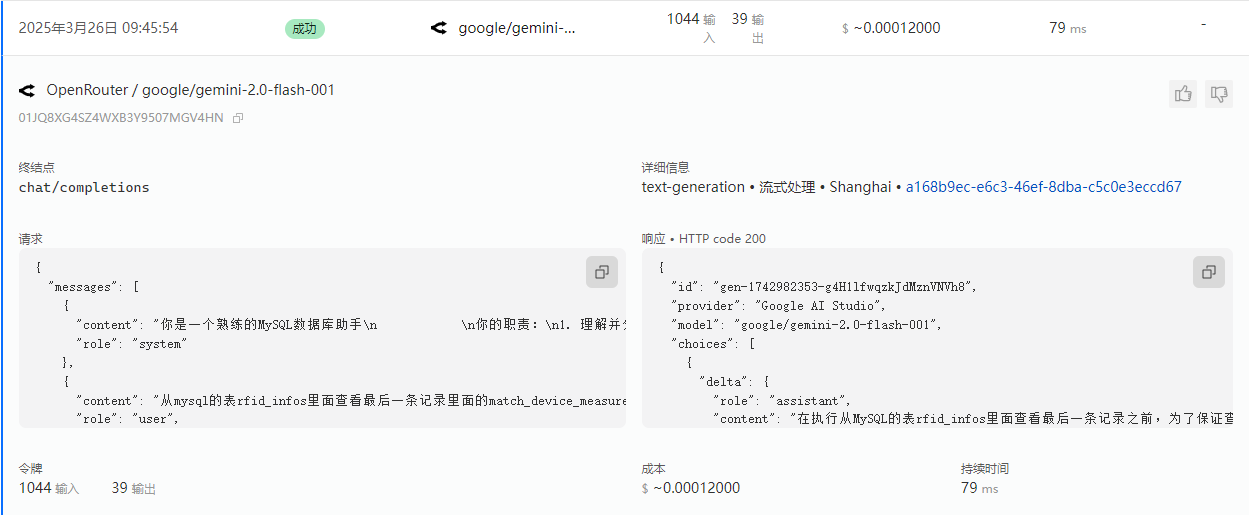
{
  "messages": [
    {
      "content": "你是一个熟练的MySQL数据库助手\n            \n你的职责:\n1. 理解并分析自然语言查询\n2. 将其转换为合适的SQL查询\n3. 使用工具在MySQL数据库上执行查询\n4. 清晰地返回并解释结果\n5. 如果需要与InfluxDB agent共享信息,请明确指出相关数据点\n6. 使用InfluxQL InfluxQL语法处理时序数据查询,不要使用Flux语法\n7. 注意Mysql是+8时区的,Influx是UTC时区的,需要考虑时区的转换\n\n以下是数据库表结构:\n---\nCREATE TABLE `rfid_infos`  (\n  `id` bigint(20) NOT NULL AUTO_INCREMENT,\n  `measurement` varchar(255) CHARACTER SET utf8 COLLATE utf8_general_ci NULL DEFAULT NULL,\n  `rfid` varchar(100) CHARACTER SET utf8 COLLATE utf8_general_ci NULL DEFAULT NULL,\n  `timestamp` datetime(3) NULL DEFAULT NULL,\n  `org_id` bigint(20) NULL DEFAULT NULL,\n  `device_name` varchar(255) CHARACTER SET utf8 COLLATE utf8_general_ci NULL DEFAULT NULL,\n  `first_rcd_time` datetime(3) NULL DEFAULT NULL,\n  `count` bigint(20) NULL DEFAULT 1,\n  `status` varchar(255) CHARACTER SET utf8 COLLATE utf8_general_ci NULL DEFAULT NULL,\n  `part_num` varchar(255) CHARACTER SET utf8 COLLATE utf8_general_ci NULL DEFAULT NULL,\n  `is_invalid` tinyint(1) NULL DEFAULT 0,\n  `match_device_measurements` text CHARACTER SET utf8 COLLATE utf8_general_ci NULL,\n  `empty_data_measurements` text CHARACTER SET utf8 COLLATE utf8_general_ci NULL,\n  `is_data_filled` tinyint(1) NULL DEFAULT NULL,\n  `created_at` datetime(3) NULL DEFAULT NULL,\n  `updated_at` datetime(3) NULL DEFAULT NULL,\n  PRIMARY KEY (`id`) USING BTREE,\n  UNIQUE INDEX `idx_measurement_rfid_timestamp`(`measurement`, `rfid`, `timestamp`) USING BTREE,\n  INDEX `idx_rfid_infos_updated_at`(`updated_at`) USING BTREE,\n  INDEX `idx_rfid_infos_created_at`(`created_at`) USING BTREE\n) ENGINE = InnoDB AUTO_INCREMENT = 360 CHARACTER SET = utf8 COLLATE = utf8_general_ci ROW_FORMAT = Dynamic;\n---\n如果用户输入不明确,在生成查询前请先询问澄清问题。\n当你完成部分任务时,总结你发现的内容以及还需要完成的工作。\n\n",
      "role": "system"
    },
    {
      "content": "从mysql的表rfid_infos里面查看最后一条记录里面的match_device_measurements是使用','分割的measurement列表。在influx里面对应measurement的值信息,根据first_rcd_time和180秒时长进行查询",
      "role": "user",
      "name": "user"
    },
    {
      "content": "好的,这个任务需要结合 MySQL 和 InfluxDB 的数据。我将按照以下步骤进行:\n\n**1. 分析查询需求:**\n\n*   需要从 MySQL 的 `rfid_infos` 表中获取最后一条记录的 `match_device_measurements` 字段。\n*   `match_device_measurements` 字段是一个以逗号分隔的 measurement 列表。\n*   需要从 InfluxDB 中查询这些 measurement 对应的数据。\n*   查询 InfluxDB 的时间范围是基于 MySQL 表中最后一条记录的 `first_rcd_time` 字段,以 `first_rcd_time` 为开始时间,加上 180 秒。\n*   需要考虑MySQL的+8时区与InfluxDB的UTC时区转换\n\n**2. 确定执行顺序:**\n\n1.  **MySQL Agent:** 首先,指示 MySQL Agent 查询 `rfid_infos` 表中最后一条记录的 `match_device_measurements` 和 `first_rcd_time` 字段。\n2.  **数据转换:** 将从 MySQL 获取的 `first_rcd_time` 转换为 UTC 时间。\n3.  **InfluxDB Agent:** 然后,指示 InfluxDB Agent 使用从 MySQL 获取的 `match_device_measurements` 列表和转换后的 UTC 时间范围进行查询。\n4.  **结果汇总:**  将从 InfluxDB 获取的数据进行整理,并返回给用户。\n\n**3. 开始执行:**\n\n我将首先调用 MySQL Agent。\n\n```tool_code\nmysql_agent.get_last_rfid_info()\n```",
      "role": "user",
      "name": "Coordinator"
    }
  ],
  "model": "google/gemini-2.0-flash-001",
  "stream": true,
  "tools": [
    {
      "type": "function",
      "function": {
        "name": "execute_query",
        "description": "执行安全的 SELECT 查询",
        "parameters": {
          "type": "object",
          "properties": {
            "input": {
              "properties": {
                "query": {
                  "description": "SQL SELECT 查询语句",
                  "title": "Query",
                  "type": "string"
                },
                "limit": {
                  "anyOf": [
                    {
                      "type": "integer"
                    },
                    {},
                    {
                      "type": "null"
                    }
                  ],
                  "default": 100,
                  "description": "返回的最大行数",
                  "title": "Limit"
                }
              },
              "required": [
                "query"
              ],
              "title": "QueryInput",
              "type": "object"
            }
          },
          "required": [
            "input"
          ],
          "additionalProperties": false
        },
        "strict": false
      }
    }
  ]
}
{
"id": "gen-1742982353-g4H1lfwqzkJdMznVNVh8",
"provider": "Google AI Studio",
"model": "google/gemini-2.0-flash-001",
"choices": [
{
"delta": {
"role": "assistant",
"content": "在执行从MySQL的表rfid_infos里面查看最后一条记录之前,为了保证查询结果的准确性,请问\"最后一条记录\"是根据哪个字段排序的?\n"
}
}
],
"usage": {
"prompt_tokens": 1044,
"completion_tokens": 39,
"total_tokens": 1083
},
"streamed_data": [
{
"nonce": "b538",
"id": "gen-1742982353-g4H1lfwqzkJdMznVNVh8",
"provider": "Google AI Studio",
"model": "google/gemini-2.0-flash-001",
"object": "chat.completion.chunk",
"created": 1742982353,
"choices": [
{
"index": 0,
"delta": {
"role": "assistant",
"content": "在"
},
"finish_reason": null,
"native_finish_reason": null,
"logprobs": null
}
]
},
{
"nonce": "bd29080c66dc6366",
"id": "gen-1742982353-g4H1lfwqzkJdMznVNVh8",
"provider": "Google AI Studio",
"model": "google/gemini-2.0-flash-001",
"object": "chat.completion.chunk",
"created": 1742982353,
"choices": [
{
"index": 0,
"delta": {
"role": "assistant",
"content": "执行从MySQL的表rfid_infos里面查看最后一条记录之前,为了"
},
"finish_reason": null,
"native_finish_reason": null,
"logprobs": null
}
]
},
{
"nonce": "2d",
"id": "gen-1742982353-g4H1lfwqzkJdMznVNVh8",
"provider": "Google AI Studio",
"model": "google/gemini-2.0-flash-001",
"object": "chat.completion.chunk",
"created": 1742982353,
"choices": [
{
"index": 0,
"delta": {
"role": "assistant",
"content": "保证查询结果的准确性,请问\"最后一条记录\"是根据哪个"
},
"finish_reason": null,
"native_finish_reason": null,
"logprobs": null
}
]
},
{
"nonce": "edf64cb762b5ffe9",
"id": "gen-1742982353-g4H1lfwqzkJdMznVNVh8",
"provider": "Google AI Studio",
"model": "google/gemini-2.0-flash-001",
"object": "chat.completion.chunk",
"created": 1742982353,
"choices": [
{
"index": 0,
"delta": {
"role": "assistant",
"content": "字段排序的?\n"
},
"finish_reason": "stop",
"native_finish_reason": "STOP",
"logprobs": null
}
]
},
{
"nonce": "649a",
"id": "gen-1742982353-g4H1lfwqzkJdMznVNVh8",
"provider": "Google AI Studio",
"model": "google/gemini-2.0-flash-001",
"object": "chat.completion.chunk",
"created": 1742982353,
"choices": [
{
"index": 0,
"delta": {
"role": "assistant",
"content": ""
},
"finish_reason": null,
"native_finish_reason": null,
"logprobs": null
}
],
"usage": {
"prompt_tokens": 1044,
"completion_tokens": 39,
"total_tokens": 1083
}
}
]
}第五轮
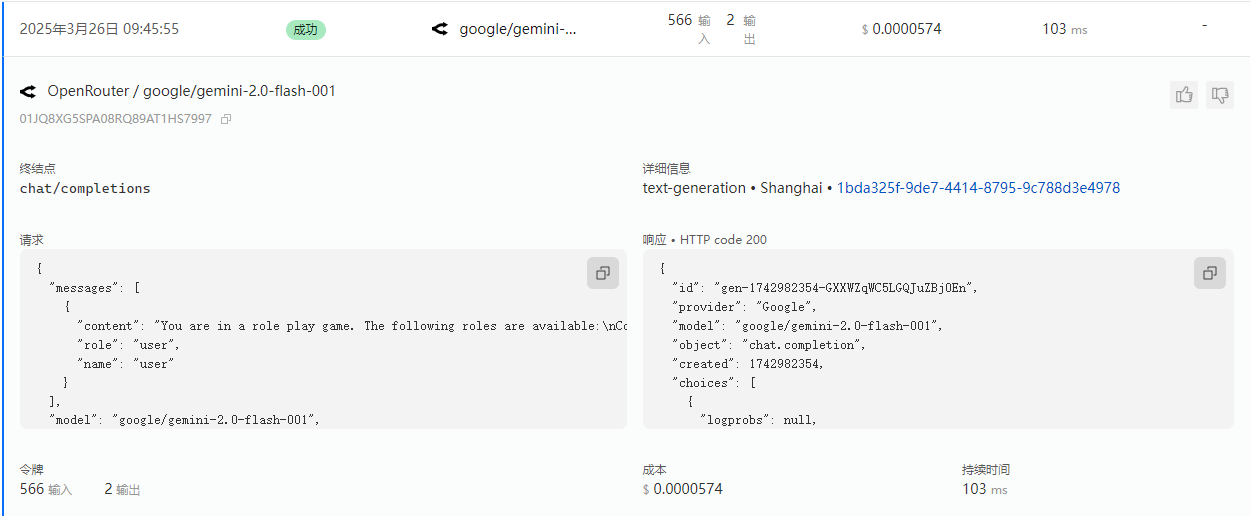
{
  "messages": [
    {
      "content": "You are in a role play game. The following roles are available:\nCoordinator: An agent that provides assistance with ability to use tools.\nMySQL_Agent: An agent that provides assistance with ability to use tools.\nInfluxDB_Agent: An agent that provides assistance with ability to use tools..\nRead the following conversation. Then select the next role from ['Coordinator', 'InfluxDB_Agent'] to play. Only return the role.\n\nuser: 从mysql的表rfid_infos里面查看最后一条记录里面的match_device_measurements是使用','分割的measurement列表。在influx里面对应measurement的值信息,根据first_rcd_time和180秒时长进行查询\n\n\nCoordinator: 好的,这个任务需要结合 MySQL 和 InfluxDB 的数据。我将按照以下步骤进行:\n\n**1. 分析查询需求:**\n\n*   需要从 MySQL 的 `rfid_infos` 表中获取最后一条记录的 `match_device_measurements` 字段。\n*   `match_device_measurements` 字段是一个以逗号分隔的 measurement 列表。\n*   需要从 InfluxDB 中查询这些 measurement 对应的数据。\n*   查询 InfluxDB 的时间范围是基于 MySQL 表中最后一条记录的 `first_rcd_time` 字段,以 `first_rcd_time` 为开始时间,加上 180 秒。\n*   需要考虑MySQL的+8时区与InfluxDB的UTC时区转换\n\n**2. 确定执行顺序:**\n\n1.  **MySQL Agent:** 首先,指示 MySQL Agent 查询 `rfid_infos` 表中最后一条记录的 `match_device_measurements` 和 `first_rcd_time` 字段。\n2.  **数据转换:** 将从 MySQL 获取的 `first_rcd_time` 转换为 UTC 时间。\n3.  **InfluxDB Agent:** 然后,指示 InfluxDB Agent 使用从 MySQL 获取的 `match_device_measurements` 列表和转换后的 UTC 时间范围进行查询。\n4.  **结果汇总:**  将从 InfluxDB 获取的数据进行整理,并返回给用户。\n\n**3. 开始执行:**\n\n我将首先调用 MySQL Agent。\n\n```tool_code\nmysql_agent.get_last_rfid_info()\n```\n\n\nMySQL_Agent: 在执行从MySQL的表rfid_infos里面查看最后一条记录之前,为了保证查询结果的准确性,请问\"最后一条记录\"是根据哪个字段排序的?\n\n\n\nRead the above conversation. Then select the next role from ['Coordinator', 'InfluxDB_Agent'] to play. Only return the role.\n",
      "role": "user",
      "name": "user"
    }
  ],
  "model": "google/gemini-2.0-flash-001",
  "stream": false
}
{
"id": "gen-1742982354-GXXWZqWC5LGQJuZBj0En",
"provider": "Google",
"model": "google/gemini-2.0-flash-001",
"object": "chat.completion",
"created": 1742982354,
"choices": [
{
"logprobs": null,
"finish_reason": "stop",
"native_finish_reason": "STOP",
"index": 0,
"message": {
"role": "assistant",
"content": "Coordinator\n",
"refusal": null
}
}
],
"usage": {
"prompt_tokens": 566,
"completion_tokens": 2,
"total_tokens": 568
}
}第六轮
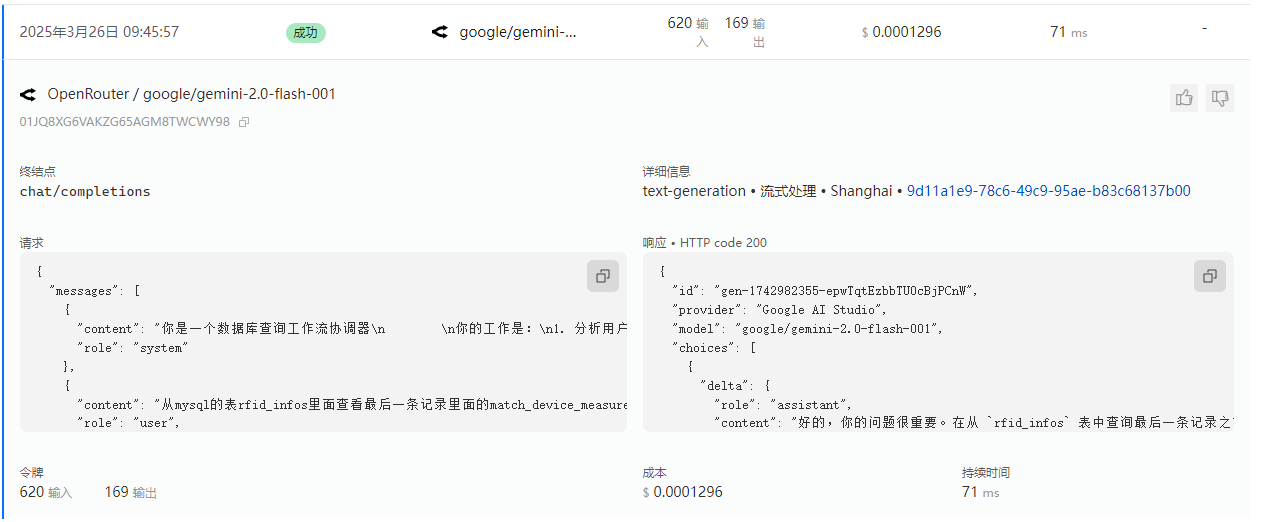
{
  "messages": [
    {
      "content": "你是一个数据库查询工作流协调器\n        \n你的工作是:\n1. 分析用户查询以确定是否需要MySQL、InfluxDB或两者\n2. 将查询定向到适当的agent\n3. 确保在需要时将MySQL中找到的数据正确传递给InfluxDB\n4. 为用户总结整体结果\n5. 当完整工作流完成时添加\"TERMINATE\"\n6. 一定要是已经查询过MysqlAgent和InfluxAgent获得数据后才可以结束,不能够只是分析了下要分别调用这两个Agent就结束\n7. 注意Mysql是+8时区的,Influx是UTC时区的,需要考虑时区的转换\n\n对于需要两个数据库的工作流:\n- 首先指导MySQL_Agent检索必要信息\n- 然后帮助InfluxDB_Agent理解需要哪些来自MySQL的数据进行查询\n- 最后将结果编译成连贯的响应\n",
      "role": "system"
    },
    {
      "content": "从mysql的表rfid_infos里面查看最后一条记录里面的match_device_measurements是使用','分割的measurement列表。在influx里面对应measurement的值信息,根据first_rcd_time和180秒时长进行查询",
      "role": "user",
      "name": "user"
    },
    {
      "content": "好的,这个任务需要结合 MySQL 和 InfluxDB 的数据。我将按照以下步骤进行:\n\n**1. 分析查询需求:**\n\n*   需要从 MySQL 的 `rfid_infos` 表中获取最后一条记录的 `match_device_measurements` 字段。\n*   `match_device_measurements` 字段是一个以逗号分隔的 measurement 列表。\n*   需要从 InfluxDB 中查询这些 measurement 对应的数据。\n*   查询 InfluxDB 的时间范围是基于 MySQL 表中最后一条记录的 `first_rcd_time` 字段,以 `first_rcd_time` 为开始时间,加上 180 秒。\n*   需要考虑MySQL的+8时区与InfluxDB的UTC时区转换\n\n**2. 确定执行顺序:**\n\n1.  **MySQL Agent:** 首先,指示 MySQL Agent 查询 `rfid_infos` 表中最后一条记录的 `match_device_measurements` 和 `first_rcd_time` 字段。\n2.  **数据转换:** 将从 MySQL 获取的 `first_rcd_time` 转换为 UTC 时间。\n3.  **InfluxDB Agent:** 然后,指示 InfluxDB Agent 使用从 MySQL 获取的 `match_device_measurements` 列表和转换后的 UTC 时间范围进行查询。\n4.  **结果汇总:**  将从 InfluxDB 获取的数据进行整理,并返回给用户。\n\n**3. 开始执行:**\n\n我将首先调用 MySQL Agent。\n\n```tool_code\nmysql_agent.get_last_rfid_info()\n```",
      "role": "assistant",
      "name": "Coordinator"
    },
    {
      "content": "在执行从MySQL的表rfid_infos里面查看最后一条记录之前,为了保证查询结果的准确性,请问\"最后一条记录\"是根据哪个字段排序的?\n",
      "role": "user",
      "name": "MySQL_Agent"
    }
  ],
  "model": "google/gemini-2.0-flash-001",
  "stream": true
}
{
"id": "gen-1742982355-epwTqtEzbbTU0cBjPCnW",
"provider": "Google AI Studio",
"model": "google/gemini-2.0-flash-001",
"choices": [
{
"delta": {
"role": "assistant",
"content": "好的,你的问题很重要。在从 `rfid_infos` 表中查询最后一条记录之前,需要明确 \"最后一条\" 是基于哪个字段排序的。\n\n**补充查询需求:**\n\n为了确保查询结果的准确性,我需要知道 `rfid_infos` 表中用于确定记录顺序的字段。 假设 `rfid_infos` 表中有一个名为 `id` 的自增主键,那么默认情况下,查询最后一条记录通常是按照 `id` 降序排列的。 但为了保证准确性,请提供 `rfid_infos` 表中用于确定记录顺序的字段名。\n\n我会先询问你 `rfid_infos` 表中使用哪个字段来确定记录的顺序,然后再指示 MySQL Agent 查询数据。 请告诉我排序字段的名称。\n"
}
}
],
"usage": {
"prompt_tokens": 620,
"completion_tokens": 169,
"total_tokens": 789
},
"streamed_data": [
{
"nonce": "83e15022",
"id": "gen-1742982355-epwTqtEzbbTU0cBjPCnW",
"provider": "Google AI Studio",
"model": "google/gemini-2.0-flash-001",
"object": "chat.completion.chunk",
"created": 1742982355,
"choices": [
{
"index": 0,
"delta": {
"role": "assistant",
"content": "好的"
},
"finish_reason": null,
"native_finish_reason": null,
"logprobs": null
}
]
},
{
"nonce": "a62e",
"id": "gen-1742982355-epwTqtEzbbTU0cBjPCnW",
"provider": "Google AI Studio",
"model": "google/gemini-2.0-flash-001",
"object": "chat.completion.chunk",
"created": 1742982355,
"choices": [
{
"index": 0,
"delta": {
"role": "assistant",
"content": ","
},
"finish_reason": null,
"native_finish_reason": null,
"logprobs": null
}
]
},
{
"nonce": "6b146b8950",
"id": "gen-1742982355-epwTqtEzbbTU0cBjPCnW",
"provider": "Google AI Studio",
"model": "google/gemini-2.0-flash-001",
"object": "chat.completion.chunk",
"created": 1742982355,
"choices": [
{
"index": 0,
"delta": {
"role": "assistant",
"content": "你的问题很重要。在从 `rfid_infos` 表中查询最后"
},
"finish_reason": null,
"native_finish_reason": null,
"logprobs": null
}
]
},
{
"nonce": "4a9dd766712d",
"id": "gen-1742982355-epwTqtEzbbTU0cBjPCnW",
"provider": "Google AI Studio",
"model": "google/gemini-2.0-flash-001",
"object": "chat.completion.chunk",
"created": 1742982355,
"choices": [
{
"index": 0,
"delta": {
"role": "assistant",
"content": "一条记录之前,需要明确 \"最后一条\" 是基于哪个字段排序的。\n\n"
},
"finish_reason": null,
"native_finish_reason": null,
"logprobs": null
}
]
},
{
"nonce": "de862e",
"id": "gen-1742982355-epwTqtEzbbTU0cBjPCnW",
"provider": "Google AI Studio",
"model": "google/gemini-2.0-flash-001",
"object": "chat.completion.chunk",
"created": 1742982355,
"choices": [
{
"index": 0,
"delta": {
"role": "assistant",
"content": "**补充查询需求:**\n\n为了确保查询结果的准确性,我需要知道 `rfid_infos` 表中用于确定记录顺序的字段。"
},
"finish_reason": null,
"native_finish_reason": null,
"logprobs": null
}
]
},
{
"nonce": "78aebe49",
"id": "gen-1742982355-epwTqtEzbbTU0cBjPCnW",
"provider": "Google AI Studio",
"model": "google/gemini-2.0-flash-001",
"object": "chat.completion.chunk",
"created": 1742982355,
"choices": [
{
"index": 0,
"delta": {
"role": "assistant",
"content": " 假设 `rfid_infos` 表中有一个名为 `id` 的自增主键,那么默认情况下,查询最后一条记录通常是按照"
},
"finish_reason": null,
"native_finish_reason": null,
"logprobs": null
}
]
},
{
"nonce": "7233e7572c75a7",
"id": "gen-1742982355-epwTqtEzbbTU0cBjPCnW",
"provider": "Google AI Studio",
"model": "google/gemini-2.0-flash-001",
"object": "chat.completion.chunk",
"created": 1742982355,
"choices": [
{
"index": 0,
"delta": {
"role": "assistant",
"content": " `id` 降序排列的。 但为了保证准确性,请提供 `rfid_infos` 表中用于确定记录顺序的字段名。\n\n我会先询问你 `rfid_infos` 表中使用哪个字段来"
},
"finish_reason": null,
"native_finish_reason": null,
"logprobs": null
}
]
},
{
"nonce": "b5911721c7",
"id": "gen-1742982355-epwTqtEzbbTU0cBjPCnW",
"provider": "Google AI Studio",
"model": "google/gemini-2.0-flash-001",
"object": "chat.completion.chunk",
"created": 1742982355,
"choices": [
{
"index": 0,
"delta": {
"role": "assistant",
"content": "确定记录的顺序,然后再指示 MySQL Agent 查询数据。 请告诉我排序字段的名称。\n"
},
"finish_reason": "stop",
"native_finish_reason": "STOP",
"logprobs": null
}
]
},
{
"nonce": "f549fbe3",
"id": "gen-1742982355-epwTqtEzbbTU0cBjPCnW",
"provider": "Google AI Studio",
"model": "google/gemini-2.0-flash-001",
"object": "chat.completion.chunk",
"created": 1742982355,
"choices": [
{
"index": 0,
"delta": {
"role": "assistant",
"content": ""
},
"finish_reason": null,
"native_finish_reason": null,
"logprobs": null
}
],
"usage": {
"prompt_tokens": 620,
"completion_tokens": 169,
"total_tokens": 789
}
}
]
}第七轮
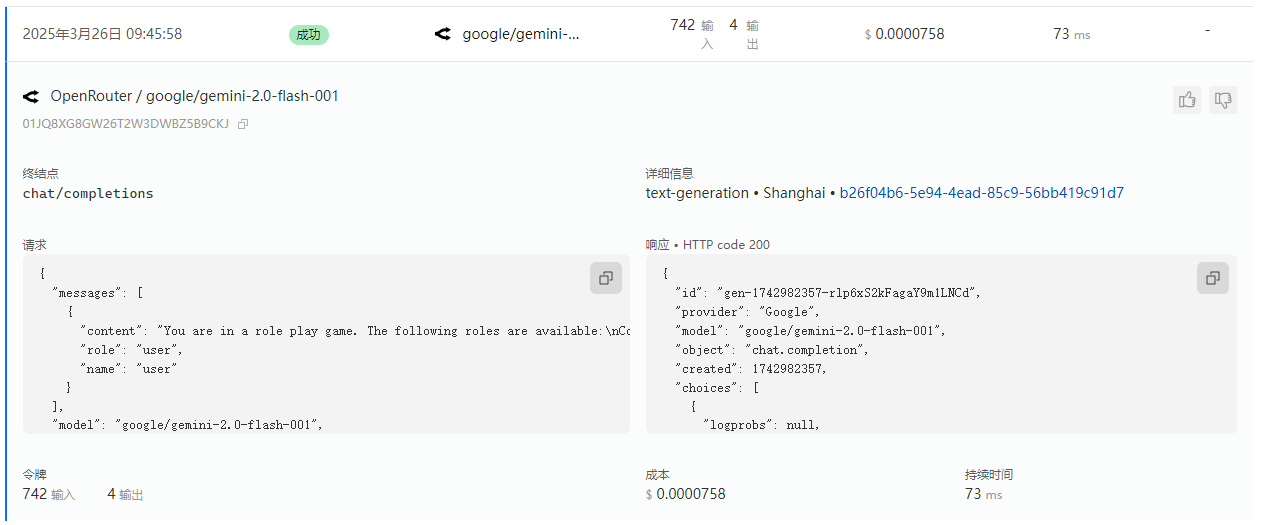
{
  "messages": [
    {
      "content": "You are in a role play game. The following roles are available:\nCoordinator: An agent that provides assistance with ability to use tools.\nMySQL_Agent: An agent that provides assistance with ability to use tools.\nInfluxDB_Agent: An agent that provides assistance with ability to use tools..\nRead the following conversation. Then select the next role from ['MySQL_Agent', 'InfluxDB_Agent'] to play. Only return the role.\n\nuser: 从mysql的表rfid_infos里面查看最后一条记录里面的match_device_measurements是使用','分割的measurement列表。在influx里面对应measurement的值信息,根据first_rcd_time和180秒时长进行查询\n\n\nCoordinator: 好的,这个任务需要结合 MySQL 和 InfluxDB 的数据。我将按照以下步骤进行:\n\n**1. 分析查询需求:**\n\n*   需要从 MySQL 的 `rfid_infos` 表中获取最后一条记录的 `match_device_measurements` 字段。\n*   `match_device_measurements` 字段是一个以逗号分隔的 measurement 列表。\n*   需要从 InfluxDB 中查询这些 measurement 对应的数据。\n*   查询 InfluxDB 的时间范围是基于 MySQL 表中最后一条记录的 `first_rcd_time` 字段,以 `first_rcd_time` 为开始时间,加上 180 秒。\n*   需要考虑MySQL的+8时区与InfluxDB的UTC时区转换\n\n**2. 确定执行顺序:**\n\n1.  **MySQL Agent:** 首先,指示 MySQL Agent 查询 `rfid_infos` 表中最后一条记录的 `match_device_measurements` 和 `first_rcd_time` 字段。\n2.  **数据转换:** 将从 MySQL 获取的 `first_rcd_time` 转换为 UTC 时间。\n3.  **InfluxDB Agent:** 然后,指示 InfluxDB Agent 使用从 MySQL 获取的 `match_device_measurements` 列表和转换后的 UTC 时间范围进行查询。\n4.  **结果汇总:**  将从 InfluxDB 获取的数据进行整理,并返回给用户。\n\n**3. 开始执行:**\n\n我将首先调用 MySQL Agent。\n\n```tool_code\nmysql_agent.get_last_rfid_info()\n```\n\n\nMySQL_Agent: 在执行从MySQL的表rfid_infos里面查看最后一条记录之前,为了保证查询结果的准确性,请问\"最后一条记录\"是根据哪个字段排序的?\n\n\nCoordinator: 好的,你的问题很重要。在从 `rfid_infos` 表中查询最后一条记录之前,需要明确 \"最后一条\" 是基于哪个字段排序的。\n\n**补充查询需求:**\n\n为了确保查询结果的准确性,我需要知道 `rfid_infos` 表中用于确定记录顺序的字段。 假设 `rfid_infos` 表中有一个名为 `id` 的自增主键,那么默认情况下,查询最后一条记录通常是按照 `id` 降序排列的。 但为了保证准确性,请提供 `rfid_infos` 表中用于确定记录顺序的字段名。\n\n我会先询问你 `rfid_infos` 表中使用哪个字段来确定记录的顺序,然后再指示 MySQL Agent 查询数据。 请告诉我排序字段的名称。\n\n\n\nRead the above conversation. Then select the next role from ['MySQL_Agent', 'InfluxDB_Agent'] to play. Only return the role.\n",
      "role": "user",
      "name": "user"
    }
  ],
  "model": "google/gemini-2.0-flash-001",
  "stream": false
}
{
"id": "gen-1742982357-rlp6xS2kFagaY9m1LNCd",
"provider": "Google",
"model": "google/gemini-2.0-flash-001",
"object": "chat.completion",
"created": 1742982357,
"choices": [
{
"logprobs": null,
"finish_reason": "stop",
"native_finish_reason": "STOP",
"index": 0,
"message": {
"role": "assistant",
"content": "MySQL_Agent\n",
"refusal": null
}
}
],
"usage": {
"prompt_tokens": 742,
"completion_tokens": 4,
"total_tokens": 746
}
}第八轮
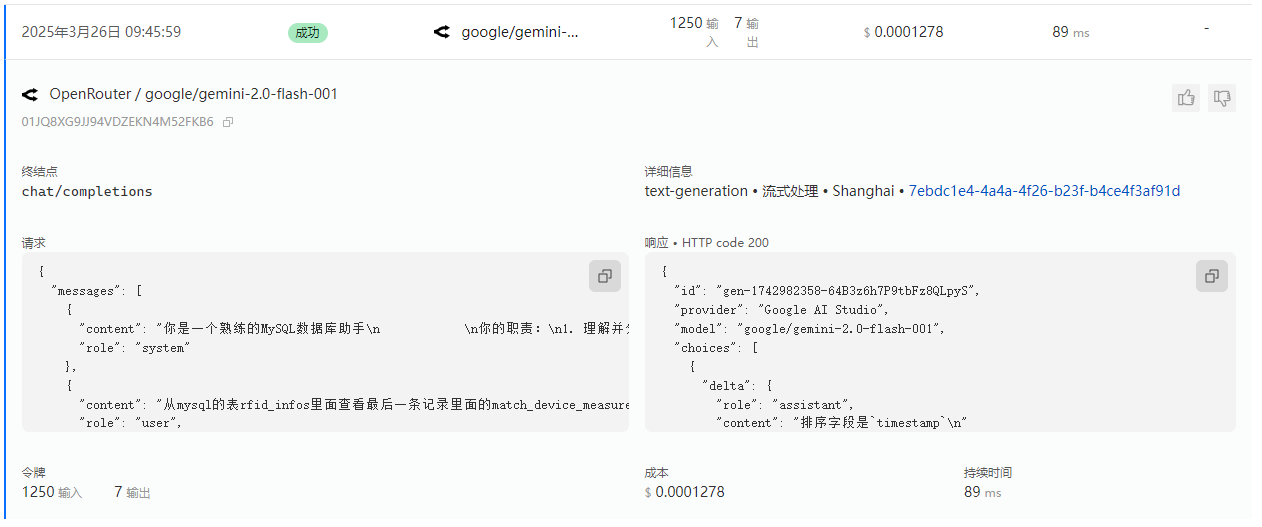
{
  "messages": [
    {
      "content": "你是一个熟练的MySQL数据库助手\n            \n你的职责:\n1. 理解并分析自然语言查询\n2. 将其转换为合适的SQL查询\n3. 使用工具在MySQL数据库上执行查询\n4. 清晰地返回并解释结果\n5. 如果需要与InfluxDB agent共享信息,请明确指出相关数据点\n6. 使用InfluxQL InfluxQL语法处理时序数据查询,不要使用Flux语法\n7. 注意Mysql是+8时区的,Influx是UTC时区的,需要考虑时区的转换\n\n以下是数据库表结构:\n---\nCREATE TABLE `rfid_infos`  (\n  `id` bigint(20) NOT NULL AUTO_INCREMENT,\n  `measurement` varchar(255) CHARACTER SET utf8 COLLATE utf8_general_ci NULL DEFAULT NULL,\n  `rfid` varchar(100) CHARACTER SET utf8 COLLATE utf8_general_ci NULL DEFAULT NULL,\n  `timestamp` datetime(3) NULL DEFAULT NULL,\n  `org_id` bigint(20) NULL DEFAULT NULL,\n  `device_name` varchar(255) CHARACTER SET utf8 COLLATE utf8_general_ci NULL DEFAULT NULL,\n  `first_rcd_time` datetime(3) NULL DEFAULT NULL,\n  `count` bigint(20) NULL DEFAULT 1,\n  `status` varchar(255) CHARACTER SET utf8 COLLATE utf8_general_ci NULL DEFAULT NULL,\n  `part_num` varchar(255) CHARACTER SET utf8 COLLATE utf8_general_ci NULL DEFAULT NULL,\n  `is_invalid` tinyint(1) NULL DEFAULT 0,\n  `match_device_measurements` text CHARACTER SET utf8 COLLATE utf8_general_ci NULL,\n  `empty_data_measurements` text CHARACTER SET utf8 COLLATE utf8_general_ci NULL,\n  `is_data_filled` tinyint(1) NULL DEFAULT NULL,\n  `created_at` datetime(3) NULL DEFAULT NULL,\n  `updated_at` datetime(3) NULL DEFAULT NULL,\n  PRIMARY KEY (`id`) USING BTREE,\n  UNIQUE INDEX `idx_measurement_rfid_timestamp`(`measurement`, `rfid`, `timestamp`) USING BTREE,\n  INDEX `idx_rfid_infos_updated_at`(`updated_at`) USING BTREE,\n  INDEX `idx_rfid_infos_created_at`(`created_at`) USING BTREE\n) ENGINE = InnoDB AUTO_INCREMENT = 360 CHARACTER SET = utf8 COLLATE = utf8_general_ci ROW_FORMAT = Dynamic;\n---\n如果用户输入不明确,在生成查询前请先询问澄清问题。\n当你完成部分任务时,总结你发现的内容以及还需要完成的工作。\n\n",
      "role": "system"
    },
    {
      "content": "从mysql的表rfid_infos里面查看最后一条记录里面的match_device_measurements是使用','分割的measurement列表。在influx里面对应measurement的值信息,根据first_rcd_time和180秒时长进行查询",
      "role": "user",
      "name": "user"
    },
    {
      "content": "好的,这个任务需要结合 MySQL 和 InfluxDB 的数据。我将按照以下步骤进行:\n\n**1. 分析查询需求:**\n\n*   需要从 MySQL 的 `rfid_infos` 表中获取最后一条记录的 `match_device_measurements` 字段。\n*   `match_device_measurements` 字段是一个以逗号分隔的 measurement 列表。\n*   需要从 InfluxDB 中查询这些 measurement 对应的数据。\n*   查询 InfluxDB 的时间范围是基于 MySQL 表中最后一条记录的 `first_rcd_time` 字段,以 `first_rcd_time` 为开始时间,加上 180 秒。\n*   需要考虑MySQL的+8时区与InfluxDB的UTC时区转换\n\n**2. 确定执行顺序:**\n\n1.  **MySQL Agent:** 首先,指示 MySQL Agent 查询 `rfid_infos` 表中最后一条记录的 `match_device_measurements` 和 `first_rcd_time` 字段。\n2.  **数据转换:** 将从 MySQL 获取的 `first_rcd_time` 转换为 UTC 时间。\n3.  **InfluxDB Agent:** 然后,指示 InfluxDB Agent 使用从 MySQL 获取的 `match_device_measurements` 列表和转换后的 UTC 时间范围进行查询。\n4.  **结果汇总:**  将从 InfluxDB 获取的数据进行整理,并返回给用户。\n\n**3. 开始执行:**\n\n我将首先调用 MySQL Agent。\n\n```tool_code\nmysql_agent.get_last_rfid_info()\n```",
      "role": "user",
      "name": "Coordinator"
    },
    {
      "content": "在执行从MySQL的表rfid_infos里面查看最后一条记录之前,为了保证查询结果的准确性,请问\"最后一条记录\"是根据哪个字段排序的?\n",
      "role": "assistant",
      "name": "MySQL_Agent"
    },
    {
      "content": "好的,你的问题很重要。在从 `rfid_infos` 表中查询最后一条记录之前,需要明确 \"最后一条\" 是基于哪个字段排序的。\n\n**补充查询需求:**\n\n为了确保查询结果的准确性,我需要知道 `rfid_infos` 表中用于确定记录顺序的字段。 假设 `rfid_infos` 表中有一个名为 `id` 的自增主键,那么默认情况下,查询最后一条记录通常是按照 `id` 降序排列的。 但为了保证准确性,请提供 `rfid_infos` 表中用于确定记录顺序的字段名。\n\n我会先询问你 `rfid_infos` 表中使用哪个字段来确定记录的顺序,然后再指示 MySQL Agent 查询数据。 请告诉我排序字段的名称。\n",
      "role": "user",
      "name": "Coordinator"
    }
  ],
  "model": "google/gemini-2.0-flash-001",
  "stream": true,
  "tools": [
    {
      "type": "function",
      "function": {
        "name": "execute_query",
        "description": "执行安全的 SELECT 查询",
        "parameters": {
          "type": "object",
          "properties": {
            "input": {
              "properties": {
                "query": {
                  "description": "SQL SELECT 查询语句",
                  "title": "Query",
                  "type": "string"
                },
                "limit": {
                  "anyOf": [
                    {
                      "type": "integer"
                    },
                    {},
                    {
                      "type": "null"
                    }
                  ],
                  "default": 100,
                  "description": "返回的最大行数",
                  "title": "Limit"
                }
              },
              "required": [
                "query"
              ],
              "title": "QueryInput",
              "type": "object"
            }
          },
          "required": [
            "input"
          ],
          "additionalProperties": false
        },
        "strict": false
      }
    }
  ]
}
{
"id": "gen-1742982358-64B3z6h7P9tbFz8QLpyS",
"provider": "Google AI Studio",
"model": "google/gemini-2.0-flash-001",
"choices": [
{
"delta": {
"role": "assistant",
"content": "排序字段是`timestamp`\n"
}
}
],
"usage": {
"prompt_tokens": 1250,
"completion_tokens": 7,
"total_tokens": 1257
},
"streamed_data": [
{
"nonce": "9632bd",
"id": "gen-1742982358-64B3z6h7P9tbFz8QLpyS",
"provider": "Google AI Studio",
"model": "google/gemini-2.0-flash-001",
"object": "chat.completion.chunk",
"created": 1742982358,
"choices": [
{
"index": 0,
"delta": {
"role": "assistant",
"content": "排序"
},
"finish_reason": null,
"native_finish_reason": null,
"logprobs": null
}
]
},
{
"nonce": "ab12955d5096",
"id": "gen-1742982358-64B3z6h7P9tbFz8QLpyS",
"provider": "Google AI Studio",
"model": "google/gemini-2.0-flash-001",
"object": "chat.completion.chunk",
"created": 1742982358,
"choices": [
{
"index": 0,
"delta": {
"role": "assistant",
"content": "字段是`timestamp`\n"
},
"finish_reason": "stop",
"native_finish_reason": "STOP",
"logprobs": null
}
]
},
{
"nonce": "559aee70",
"id": "gen-1742982358-64B3z6h7P9tbFz8QLpyS",
"provider": "Google AI Studio",
"model": "google/gemini-2.0-flash-001",
"object": "chat.completion.chunk",
"created": 1742982358,
"choices": [
{
"index": 0,
"delta": {
"role": "assistant",
"content": ""
},
"finish_reason": null,
"native_finish_reason": null,
"logprobs": null
}
],
"usage": {
"prompt_tokens": 1250,
"completion_tokens": 7,
"total_tokens": 1257
}
}
]
}第九轮
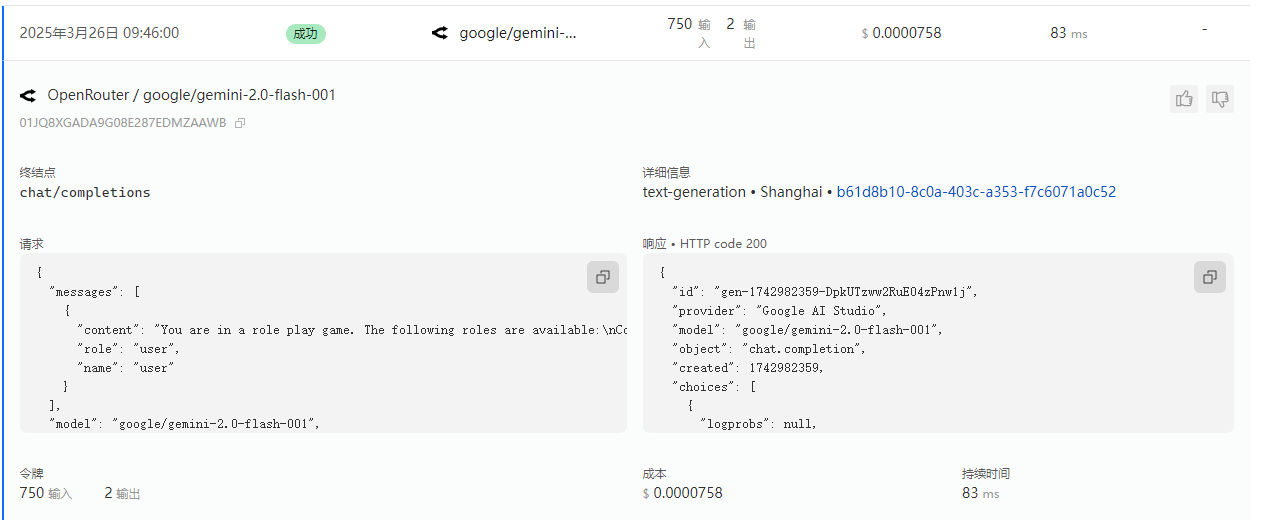
{
  "messages": [
    {
      "content": "You are in a role play game. The following roles are available:\nCoordinator: An agent that provides assistance with ability to use tools.\nMySQL_Agent: An agent that provides assistance with ability to use tools.\nInfluxDB_Agent: An agent that provides assistance with ability to use tools..\nRead the following conversation. Then select the next role from ['Coordinator', 'InfluxDB_Agent'] to play. Only return the role.\n\nuser: 从mysql的表rfid_infos里面查看最后一条记录里面的match_device_measurements是使用','分割的measurement列表。在influx里面对应measurement的值信息,根据first_rcd_time和180秒时长进行查询\n\n\nCoordinator: 好的,这个任务需要结合 MySQL 和 InfluxDB 的数据。我将按照以下步骤进行:\n\n**1. 分析查询需求:**\n\n*   需要从 MySQL 的 `rfid_infos` 表中获取最后一条记录的 `match_device_measurements` 字段。\n*   `match_device_measurements` 字段是一个以逗号分隔的 measurement 列表。\n*   需要从 InfluxDB 中查询这些 measurement 对应的数据。\n*   查询 InfluxDB 的时间范围是基于 MySQL 表中最后一条记录的 `first_rcd_time` 字段,以 `first_rcd_time` 为开始时间,加上 180 秒。\n*   需要考虑MySQL的+8时区与InfluxDB的UTC时区转换\n\n**2. 确定执行顺序:**\n\n1.  **MySQL Agent:** 首先,指示 MySQL Agent 查询 `rfid_infos` 表中最后一条记录的 `match_device_measurements` 和 `first_rcd_time` 字段。\n2.  **数据转换:** 将从 MySQL 获取的 `first_rcd_time` 转换为 UTC 时间。\n3.  **InfluxDB Agent:** 然后,指示 InfluxDB Agent 使用从 MySQL 获取的 `match_device_measurements` 列表和转换后的 UTC 时间范围进行查询。\n4.  **结果汇总:**  将从 InfluxDB 获取的数据进行整理,并返回给用户。\n\n**3. 开始执行:**\n\n我将首先调用 MySQL Agent。\n\n```tool_code\nmysql_agent.get_last_rfid_info()\n```\n\n\nMySQL_Agent: 在执行从MySQL的表rfid_infos里面查看最后一条记录之前,为了保证查询结果的准确性,请问\"最后一条记录\"是根据哪个字段排序的?\n\n\nCoordinator: 好的,你的问题很重要。在从 `rfid_infos` 表中查询最后一条记录之前,需要明确 \"最后一条\" 是基于哪个字段排序的。\n\n**补充查询需求:**\n\n为了确保查询结果的准确性,我需要知道 `rfid_infos` 表中用于确定记录顺序的字段。 假设 `rfid_infos` 表中有一个名为 `id` 的自增主键,那么默认情况下,查询最后一条记录通常是按照 `id` 降序排列的。 但为了保证准确性,请提供 `rfid_infos` 表中用于确定记录顺序的字段名。\n\n我会先询问你 `rfid_infos` 表中使用哪个字段来确定记录的顺序,然后再指示 MySQL Agent 查询数据。 请告诉我排序字段的名称。\n\n\nMySQL_Agent: 排序字段是`timestamp`\n\n\n\nRead the above conversation. Then select the next role from ['Coordinator', 'InfluxDB_Agent'] to play. Only return the role.\n",
      "role": "user",
      "name": "user"
    }
  ],
  "model": "google/gemini-2.0-flash-001",
  "stream": false
}
{
"id": "gen-1742982359-DpkUTzww2RuE04zPnw1j",
"provider": "Google AI Studio",
"model": "google/gemini-2.0-flash-001",
"object": "chat.completion",
"created": 1742982359,
"choices": [
{
"logprobs": null,
"finish_reason": "stop",
"native_finish_reason": "STOP",
"index": 0,
"message": {
"role": "assistant",
"content": "Coordinator\n",
"refusal": null
}
}
],
"usage": {
"prompt_tokens": 750,
"completion_tokens": 2,
"total_tokens": 752
}
}第十轮
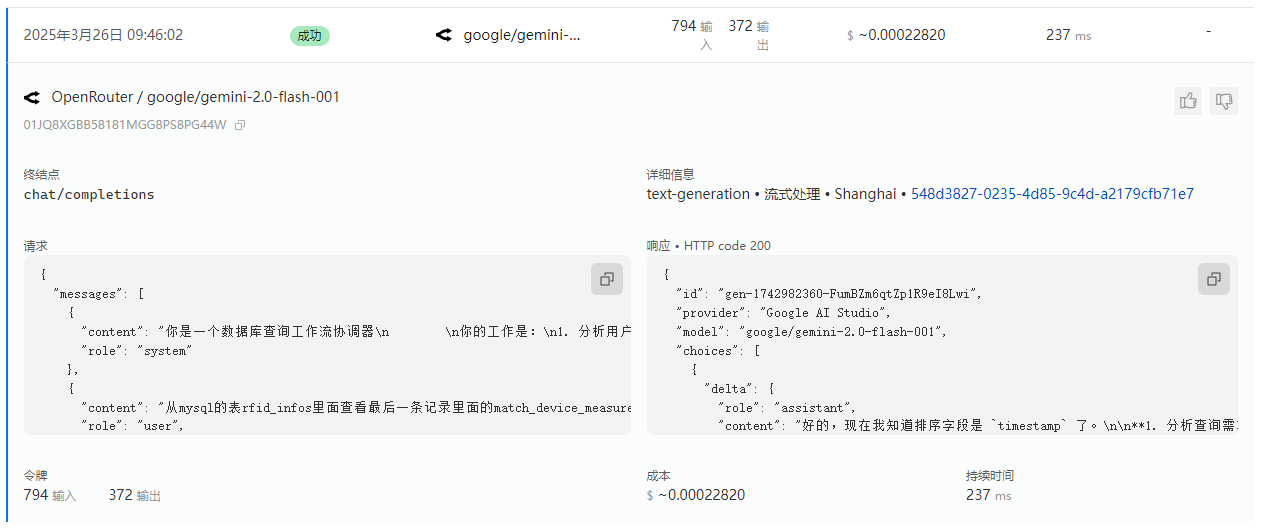
{
  "messages": [
    {
      "content": "你是一个数据库查询工作流协调器\n        \n你的工作是:\n1. 分析用户查询以确定是否需要MySQL、InfluxDB或两者\n2. 将查询定向到适当的agent\n3. 确保在需要时将MySQL中找到的数据正确传递给InfluxDB\n4. 为用户总结整体结果\n5. 当完整工作流完成时添加\"TERMINATE\"\n6. 一定要是已经查询过MysqlAgent和InfluxAgent获得数据后才可以结束,不能够只是分析了下要分别调用这两个Agent就结束\n7. 注意Mysql是+8时区的,Influx是UTC时区的,需要考虑时区的转换\n\n对于需要两个数据库的工作流:\n- 首先指导MySQL_Agent检索必要信息\n- 然后帮助InfluxDB_Agent理解需要哪些来自MySQL的数据进行查询\n- 最后将结果编译成连贯的响应\n",
      "role": "system"
    },
    {
      "content": "从mysql的表rfid_infos里面查看最后一条记录里面的match_device_measurements是使用','分割的measurement列表。在influx里面对应measurement的值信息,根据first_rcd_time和180秒时长进行查询",
      "role": "user",
      "name": "user"
    },
    {
      "content": "好的,这个任务需要结合 MySQL 和 InfluxDB 的数据。我将按照以下步骤进行:\n\n**1. 分析查询需求:**\n\n*   需要从 MySQL 的 `rfid_infos` 表中获取最后一条记录的 `match_device_measurements` 字段。\n*   `match_device_measurements` 字段是一个以逗号分隔的 measurement 列表。\n*   需要从 InfluxDB 中查询这些 measurement 对应的数据。\n*   查询 InfluxDB 的时间范围是基于 MySQL 表中最后一条记录的 `first_rcd_time` 字段,以 `first_rcd_time` 为开始时间,加上 180 秒。\n*   需要考虑MySQL的+8时区与InfluxDB的UTC时区转换\n\n**2. 确定执行顺序:**\n\n1.  **MySQL Agent:** 首先,指示 MySQL Agent 查询 `rfid_infos` 表中最后一条记录的 `match_device_measurements` 和 `first_rcd_time` 字段。\n2.  **数据转换:** 将从 MySQL 获取的 `first_rcd_time` 转换为 UTC 时间。\n3.  **InfluxDB Agent:** 然后,指示 InfluxDB Agent 使用从 MySQL 获取的 `match_device_measurements` 列表和转换后的 UTC 时间范围进行查询。\n4.  **结果汇总:**  将从 InfluxDB 获取的数据进行整理,并返回给用户。\n\n**3. 开始执行:**\n\n我将首先调用 MySQL Agent。\n\n```tool_code\nmysql_agent.get_last_rfid_info()\n```",
      "role": "assistant",
      "name": "Coordinator"
    },
    {
      "content": "在执行从MySQL的表rfid_infos里面查看最后一条记录之前,为了保证查询结果的准确性,请问\"最后一条记录\"是根据哪个字段排序的?\n",
      "role": "user",
      "name": "MySQL_Agent"
    },
    {
      "content": "好的,你的问题很重要。在从 `rfid_infos` 表中查询最后一条记录之前,需要明确 \"最后一条\" 是基于哪个字段排序的。\n\n**补充查询需求:**\n\n为了确保查询结果的准确性,我需要知道 `rfid_infos` 表中用于确定记录顺序的字段。 假设 `rfid_infos` 表中有一个名为 `id` 的自增主键,那么默认情况下,查询最后一条记录通常是按照 `id` 降序排列的。 但为了保证准确性,请提供 `rfid_infos` 表中用于确定记录顺序的字段名。\n\n我会先询问你 `rfid_infos` 表中使用哪个字段来确定记录的顺序,然后再指示 MySQL Agent 查询数据。 请告诉我排序字段的名称。\n",
      "role": "assistant",
      "name": "Coordinator"
    },
    {
      "content": "排序字段是`timestamp`\n",
      "role": "user",
      "name": "MySQL_Agent"
    }
  ],
  "model": "google/gemini-2.0-flash-001",
  "stream": true
}
{
"id": "gen-1742982360-FumBZm6qtZp1R9eI8Lwi",
"provider": "Google AI Studio",
"model": "google/gemini-2.0-flash-001",
"choices": [
{
"delta": {
"role": "assistant",
"content": "好的,现在我知道排序字段是 `timestamp` 了。\n\n**1. 分析查询需求(更新):**\n\n* 需要从 MySQL 的 `rfid_infos` 表中,**按照 `timestamp` 字段排序**,获取最后一条记录的 `match_device_measurements` 字段。\n* `match_device_measurements` 字段是一个以逗号分隔的 measurement 列表。\n* 需要从 InfluxDB 中查询这些 measurement 对应的数据。\n* 查询 InfluxDB 的时间范围是基于 MySQL 表中最后一条记录的 `first_rcd_time` 字段,以 `first_rcd_time` 为开始时间,加上 180 秒。\n* 需要考虑MySQL的+8时区与InfluxDB的UTC时区转换\n\n**2. 确定执行顺序:**\n\n1. **MySQL Agent:** 首先,指示 MySQL Agent 查询 `rfid_infos` 表中 **按照 `timestamp` 排序** 最后一条记录的 `match_device_measurements` 和 `first_rcd_time` 字段。\n2. **数据转换:** 将从 MySQL 获取的 `first_rcd_time` 转换为 UTC 时间。\n3. **InfluxDB Agent:** 然后,指示 InfluxDB Agent 使用从 MySQL 获取的 `match_device_measurements` 列表和转换后的 UTC 时间范围进行查询。\n4. **结果汇总:** 将从 InfluxDB 获取的数据进行整理,并返回给用户。\n\n**3. 开始执行:**\n\n我现在将调用 MySQL Agent,并明确指定按照 `timestamp` 排序。\n\n```tool_code\nmysql_agent.get_last_rfid_info_by_timestamp()\n```"
}
}
],
"usage": {
"prompt_tokens": 794,
"completion_tokens": 372,
"total_tokens": 1166
},
"streamed_data": [
{
"nonce": "fb2e4638",
"id": "gen-1742982360-FumBZm6qtZp1R9eI8Lwi",
"provider": "Google AI Studio",
"model": "google/gemini-2.0-flash-001",
"object": "chat.completion.chunk",
"created": 1742982360,
"choices": [
{
"index": 0,
"delta": {
"role": "assistant",
"content": "好的"
},
"finish_reason": null,
"native_finish_reason": null,
"logprobs": null
}
]
},
{
"nonce": "ffdcea34955651",
"id": "gen-1742982360-FumBZm6qtZp1R9eI8Lwi",
"provider": "Google AI Studio",
"model": "google/gemini-2.0-flash-001",
"object": "chat.completion.chunk",
"created": 1742982360,
"choices": [
{
"index": 0,
"delta": {
"role": "assistant",
"content": ",现在我知道排序字段是 `timestamp` 了。\n\n**1. 分析"
},
"finish_reason": null,
"native_finish_reason": null,
"logprobs": null
}
]
},
{
"nonce": "92321775a7d4d7",
"id": "gen-1742982360-FumBZm6qtZp1R9eI8Lwi",
"provider": "Google AI Studio",
"model": "google/gemini-2.0-flash-001",
"object": "chat.completion.chunk",
"created": 1742982360,
"choices": [
{
"index": 0,
"delta": {
"role": "assistant",
"content": "查询需求(更新):**\n\n* 需要从 MySQL 的 `rfid"
},
"finish_reason": null,
"native_finish_reason": null,
"logprobs": null
}
]
},
{
"nonce": "5667",
"id": "gen-1742982360-FumBZm6qtZp1R9eI8Lwi",
"provider": "Google AI Studio",
"model": "google/gemini-2.0-flash-001",
"object": "chat.completion.chunk",
"created": 1742982360,
"choices": [
{
"index": 0,
"delta": {
"role": "assistant",
"content": "_infos` 表中,**按照 `timestamp` 字段排序**,获取最后一条记录的 `match_device_measurements` 字段。"
},
"finish_reason": null,
"native_finish_reason": null,
"logprobs": null
}
]
},
{
"nonce": "c8f237",
"id": "gen-1742982360-FumBZm6qtZp1R9eI8Lwi",
"provider": "Google AI Studio",
"model": "google/gemini-2.0-flash-001",
"object": "chat.completion.chunk",
"created": 1742982360,
"choices": [
{
"index": 0,
"delta": {
"role": "assistant",
"content": "\n* `match_device_measurements` 字段是一个以逗号分隔的 measurement 列表。\n* 需要从 InfluxDB 中"
},
"finish_reason": null,
"native_finish_reason": null,
"logprobs": null
}
]
},
{
"nonce": "309d",
"id": "gen-1742982360-FumBZm6qtZp1R9eI8Lwi",
"provider": "Google AI Studio",
"model": "google/gemini-2.0-flash-001",
"object": "chat.completion.chunk",
"created": 1742982360,
"choices": [
{
"index": 0,
"delta": {
"role": "assistant",
"content": "查询这些 measurement 对应的数据。\n* 查询 InfluxDB 的时间范围是基于 MySQL 表中最后一条记录的 `first_rcd_time` 字段,以 `first_rcd_time` 为开始"
},
"finish_reason": null,
"native_finish_reason": null,
"logprobs": null
}
]
},
{
"nonce": "e2e5d3fc60",
"id": "gen-1742982360-FumBZm6qtZp1R9eI8Lwi",
"provider": "Google AI Studio",
"model": "google/gemini-2.0-flash-001",
"object": "chat.completion.chunk",
"created": 1742982360,
"choices": [
{
"index": 0,
"delta": {
"role": "assistant",
"content": "时间,加上 180 秒。\n* 需要考虑MySQL的+8时区与InfluxDB的UTC时区转换\n\n**2. 确定执行顺序:**\n\n1. **MySQL Agent:** 首先,指示"
},
"finish_reason": null,
"native_finish_reason": null,
"logprobs": null
}
]
},
{
"nonce": "8bc87a446f9972",
"id": "gen-1742982360-FumBZm6qtZp1R9eI8Lwi",
"provider": "Google AI Studio",
"model": "google/gemini-2.0-flash-001",
"object": "chat.completion.chunk",
"created": 1742982360,
"choices": [
{
"index": 0,
"delta": {
"role": "assistant",
"content": " MySQL Agent 查询 `rfid_infos` 表中 **按照 `timestamp` 排序** 最后一条记录的 `match_device_measurements` 和 `first_rcd_time` 字段。\n2. **数据转换:** 将从 MySQL 获取的 `first_rcd_time"
},
"finish_reason": null,
"native_finish_reason": null,
"logprobs": null
}
]
},
{
"nonce": "5e99e53ee7b7",
"id": "gen-1742982360-FumBZm6qtZp1R9eI8Lwi",
"provider": "Google AI Studio",
"model": "google/gemini-2.0-flash-001",
"object": "chat.completion.chunk",
"created": 1742982360,
"choices": [
{
"index": 0,
"delta": {
"role": "assistant",
"content": "` 转换为 UTC 时间。\n3. **InfluxDB Agent:** 然后,指示 InfluxDB Agent 使用从 MySQL 获取的 `match_device_measurements` 列表和转换后的 UTC 时间范围进行查询。\n4. **结果汇总:** 将从 InfluxDB 获取的数据"
},
"finish_reason": null,
"native_finish_reason": null,
"logprobs": null
}
]
},
{
"nonce": "da0d",
"id": "gen-1742982360-FumBZm6qtZp1R9eI8Lwi",
"provider": "Google AI Studio",
"model": "google/gemini-2.0-flash-001",
"object": "chat.completion.chunk",
"created": 1742982360,
"choices": [
{
"index": 0,
"delta": {
"role": "assistant",
"content": "进行整理,并返回给用户。\n\n**3. 开始执行:**\n\n我现在将调用 MySQL Agent,并明确指定按照 `timestamp` 排序。\n\n```tool_code\nmysql_agent.get_last_rfid_info_by_timestamp()\n```"
},
"finish_reason": "stop",
"native_finish_reason": "STOP",
"logprobs": null
}
]
},
{
"nonce": "f62ced899f",
"id": "gen-1742982360-FumBZm6qtZp1R9eI8Lwi",
"provider": "Google AI Studio",
"model": "google/gemini-2.0-flash-001",
"object": "chat.completion.chunk",
"created": 1742982360,
"choices": [
{
"index": 0,
"delta": {
"role": "assistant",
"content": ""
},
"finish_reason": null,
"native_finish_reason": null,
"logprobs": null
}
],
"usage": {
"prompt_tokens": 794,
"completion_tokens": 372,
"total_tokens": 1166
}
}
]
}最后一轮
{
  "messages": [
    {
      "content": "你是一个专业的InfluxDB 1.x时序数据库助手\n            \n你的职责:\n1. 使用InfluxQL InfluxQL语法处理时序数据查询,不要使用Flux语法\n2. 在对话中查找有关测量值、时间范围和查询参数的信息\n3. 如果需要,使用来自MySQL查询的数据进行查询\n4. 使用工具在InfluxDB数据库上执行查询\n5. 以清晰易懂的格式呈现时序数据\n6. 注意Mysql是+8时区的,Influx是UTC时区的,需要考虑时区的转换\n\n如果需要更多信息来形成完整查询,请提出具体问题。\n当你完成分析时,总结发现并添加\"TERMINATE\"以表示任务完成。\n",
      "role": "system"
    },
    {
      "content": "从mysql的表rfid_infos里面查看最后一条记录里面的match_device_measurements是使用','分割的measurement列表。在influx里面对应measurement的值信息,根据first_rcd_time和180秒时长进行查询",
      "role": "user",
      "name": "user"
    },
    {
      "content": "好的,这个任务需要结合 MySQL 和 InfluxDB 的数据。我将按照以下步骤进行:\n\n**1. 分析查询需求:**\n\n*   需要从 MySQL 的 `rfid_infos` 表中获取最后一条记录的 `match_device_measurements` 字段。\n*   `match_device_measurements` 字段是一个以逗号分隔的 measurement 列表。\n*   需要从 InfluxDB 中查询这些 measurement 对应的数据。\n*   查询 InfluxDB 的时间范围是基于 MySQL 表中最后一条记录的 `first_rcd_time` 字段,以 `first_rcd_time` 为开始时间,加上 180 秒。\n*   需要考虑MySQL的+8时区与InfluxDB的UTC时区转换\n\n**2. 确定执行顺序:**\n\n1.  **MySQL Agent:** 首先,指示 MySQL Agent 查询 `rfid_infos` 表中最后一条记录的 `match_device_measurements` 和 `first_rcd_time` 字段。\n2.  **数据转换:** 将从 MySQL 获取的 `first_rcd_time` 转换为 UTC 时间。\n3.  **InfluxDB Agent:** 然后,指示 InfluxDB Agent 使用从 MySQL 获取的 `match_device_measurements` 列表和转换后的 UTC 时间范围进行查询。\n4.  **结果汇总:**  将从 InfluxDB 获取的数据进行整理,并返回给用户。\n\n**3. 开始执行:**\n\n我将首先调用 MySQL Agent。\n\n```tool_code\nmysql_agent.get_last_rfid_info()\n```",
      "role": "user",
      "name": "Coordinator"
    },
    {
      "content": "在执行从MySQL的表rfid_infos里面查看最后一条记录之前,为了保证查询结果的准确性,请问\"最后一条记录\"是根据哪个字段排序的?\n",
      "role": "user",
      "name": "MySQL_Agent"
    },
    {
      "content": "好的,你的问题很重要。在从 `rfid_infos` 表中查询最后一条记录之前,需要明确 \"最后一条\" 是基于哪个字段排序的。\n\n**补充查询需求:**\n\n为了确保查询结果的准确性,我需要知道 `rfid_infos` 表中用于确定记录顺序的字段。 假设 `rfid_infos` 表中有一个名为 `id` 的自增主键,那么默认情况下,查询最后一条记录通常是按照 `id` 降序排列的。 但为了保证准确性,请提供 `rfid_infos` 表中用于确定记录顺序的字段名。\n\n我会先询问你 `rfid_infos` 表中使用哪个字段来确定记录的顺序,然后再指示 MySQL Agent 查询数据。 请告诉我排序字段的名称。\n",
      "role": "user",
      "name": "Coordinator"
    },
    {
      "content": "排序字段是`timestamp`\n",
      "role": "user",
      "name": "MySQL_Agent"
    },
    {
      "content": "好的,现在我知道排序字段是 `timestamp` 了。\n\n**1. 分析查询需求(更新):**\n\n*   需要从 MySQL 的 `rfid_infos` 表中,**按照 `timestamp` 字段排序**,获取最后一条记录的 `match_device_measurements` 字段。\n*   `match_device_measurements` 字段是一个以逗号分隔的 measurement 列表。\n*   需要从 InfluxDB 中查询这些 measurement 对应的数据。\n*   查询 InfluxDB 的时间范围是基于 MySQL 表中最后一条记录的 `first_rcd_time` 字段,以 `first_rcd_time` 为开始时间,加上 180 秒。\n*   需要考虑MySQL的+8时区与InfluxDB的UTC时区转换\n\n**2. 确定执行顺序:**\n\n1.  **MySQL Agent:** 首先,指示 MySQL Agent 查询 `rfid_infos` 表中 **按照 `timestamp` 排序** 最后一条记录的 `match_device_measurements` 和 `first_rcd_time` 字段。\n2.  **数据转换:** 将从 MySQL 获取的 `first_rcd_time` 转换为 UTC 时间。\n3.  **InfluxDB Agent:** 然后,指示 InfluxDB Agent 使用从 MySQL 获取的 `match_device_measurements` 列表和转换后的 UTC 时间范围进行查询。\n4.  **结果汇总:**  将从 InfluxDB 获取的数据进行整理,并返回给用户。\n\n**3. 开始执行:**\n\n我现在将调用 MySQL Agent,并明确指定按照 `timestamp` 排序。\n\n```tool_code\nmysql_agent.get_last_rfid_info_by_timestamp()\n```",
      "role": "user",
      "name": "Coordinator"
    },
    {
      "content": "我无法使用你提供的`mysql_agent.get_last_rfid_info_by_timestamp()`, 目前我只被授权使用`default_api.execute_query`。请提供符合API规范的请求。\n",
      "role": "user",
      "name": "MySQL_Agent"
    },
    {
      "content": "好的,明白了。你需要我使用 `default_api.execute_query` 来执行 MySQL 查询。\n\n**1. 构造 MySQL 查询语句:**\n\n由于需要获取 `rfid_infos` 表中按照 `timestamp` 排序的最后一条记录的 `match_device_measurements` 和 `first_rcd_time` 字段,可以使用以下 SQL 查询语句:\n\n```sql\nSELECT match_device_measurements, first_rcd_time FROM rfid_infos ORDER BY timestamp DESC LIMIT 1;\n```\n\n**2. 调用 MySQL Agent (通过 `default_api.execute_query`):**\n\n现在我将构造一个使用 `default_api.execute_query` 的请求,来执行上述 SQL 查询。\n\n```tool_code\ndefault_api.execute_query(query=\"SELECT match_device_measurements, first_rcd_time FROM rfid_infos ORDER BY timestamp DESC LIMIT 1;\")\n```",
      "role": "user",
      "name": "Coordinator"
    },
    {
      "content": "**1. 分析结果:**\n\n从 MySQL 查询得到的结果如下:\n\n*   `match_device_measurements`: \"89,90\"\n*   `first_rcd_time`: \"2025-03-20 09:36:11\"\n\n**2. 数据转换:**\n\n*   **Measurement 列表:** `match_device_measurements` 字段包含两个 measurement,分别是 \"89\" 和 \"90\"。\n*   **时间转换:** 需要将 `first_rcd_time` (2025-03-20 09:36:11 +08:00) 转换为 UTC 时间。  北京时间 2025-03-20 09:36:11 对应 UTC 时间为 2025-03-20 01:36:11。\n*   **计算结束时间:**  需要在 UTC 时间 2025-03-20 01:36:11 的基础上加上 180 秒,得到结束时间 2025-03-20 01:39:11。\n\n**3. 构造 InfluxDB 查询语句:**\n\n现在,我们需要构造 InfluxDB 的查询语句。 由于要查询多个 measurement,并且需要指定时间范围,可以使用以下 InfluxQL 语句:\n\n```influxql\nSELECT * FROM \"89\",\"90\" WHERE time >= '2025-03-20T01:36:11Z' AND time <= '2025-03-20T01:39:11Z'\n```\n\n**4. 调用 InfluxDB Agent:**\n\n现在我将调用 InfluxDB Agent,使用上述 InfluxQL 查询语句查询数据。\n\n```tool_code\ninfluxdb_agent.query_data(query='SELECT * FROM \"89\",\"90\" WHERE time >= \\'2025-03-20T01:36:11Z\\' AND time <= \\'2025-03-20T01:39:11Z\\'')\n```",
      "role": "user",
      "name": "MySQL_Agent"
    },
    {
      "content": "我无法使用你提供的`influxdb_agent.query_data`, 目前我只被授权使用`default_api.execute_query`。请提供符合API规范的请求。\n好的,明白了。我需要使用 `default_api.execute_query` 来执行 InfluxDB 查询。\n\n**1. 构造 InfluxDB 查询语句:**\n\n和之前一样,我们需要构造 InfluxDB 的查询语句。 由于要查询多个 measurement,并且需要指定时间范围,可以使用以下 InfluxQL 语句:\n\n```influxql\nSELECT * FROM \"89\",\"90\" WHERE time >= '2025-03-20T01:36:11Z' AND time <= '2025-03-20T01:39:11Z'\n```\n\n**2. 调用 InfluxDB Agent (通过 `default_api.execute_query`):**\n\n现在我将构造一个使用 `default_api.execute_query` 的请求,来执行上述 InfluxQL 查询。\n\n",
      "tool_calls": [
        {
          "id": "tool_0_execute_query",
          "function": {
            "arguments": "{\"input\":{\"limit\":\"100\",\"query\":\"SELECT * FROM \\\"89\\\",\\\"90\\\" WHERE time >= '2025-03-20T01:36:11Z' AND time <= '2025-03-20T01:39:11Z'\"}}",
            "name": "execute_query"
          },
          "type": "function"
        }
      ],
      "role": "assistant",
      "name": "InfluxDB_Agent"
    },
    {
      "content": "[TextContent(type='text', text='time | compID | operationValue | value\\n2025-03-20T01:36:13Z | 0013 | 属性2-1关键 | 112\\n2025-03-20T01:36:18Z | 0013 | 属性2-1 | 112\\n2025-03-20T01:36:18Z | 0013 | 属性2-1关键 | 167\\n2025-03-20T01:36:23Z | 0013 | 属性2-1关键 | 143\\n2025-03-20T01:36:28Z | 0013 | 属性2-1 | 183\\n2025-03-20T01:36:28Z | 0013 | 属性2-1关键 | 189\\n2025-03-20T01:36:38Z | 0013 | 属性2-1 | 110\\n2025-03-20T01:36:48Z | 0013 | 属性2-1 | 170\\n2025-03-20T01:36:58Z | 0013 | 属性2-1 | 138\\n2025-03-20T01:37:08Z | 0013 | 属性2-1 | 178\\n2025-03-20T01:37:18Z | 0013 | 属性2-1 | 177\\n2025-03-20T01:37:28Z | 0013 | 属性2-1 | 158\\n2025-03-20T01:37:38Z | 0013 | 属性2-1 | 159\\n2025-03-20T01:37:48Z | 0013 | 属性2-1 | 152\\n2025-03-20T01:37:58Z | 0013 | 属性2-1 | 120\\ntime | compID | operationValue | value\\n2025-03-20T01:36:38Z | 0013 | 属性2-2 | 299\\n2025-03-20T01:36:38Z | 0013 | 属性2-2关键 | 260\\n2025-03-20T01:36:43Z | 0013 | 属性2-2关键 | 254\\n2025-03-20T01:36:48Z | 0013 | 属性2-2 | 226\\n2025-03-20T01:36:48Z | 0013 | 属性2-2关键 | 292\\n2025-03-20T01:36:53Z | 0013 | 属性2-2关键 | 205\\n2025-03-20T01:36:58Z | 0013 | 属性2-2 | 271\\n2025-03-20T01:36:58Z | 0013 | 属性2-2关键 | 245\\n2025-03-20T01:37:03Z | 0013 | 属性2-2关键 | 226\\n2025-03-20T01:37:08Z | 0013 | 属性2-2关键 | 242\\n2025-03-20T01:37:13Z | 0013 | 属性2-2关键 | 207\\n2025-03-20T01:37:18Z | 0013 | 属性2-2关键 | 258', annotations=None)]",
      "role": "tool",
      "tool_call_id": "tool_0_execute_query"
    }
  ],
  "model": "google/gemini-2.0-flash-001",
  "stream": true
}